How the QR and phone rails work, what the payer does, and the conditions that decide whether the tile appears.
BurundiPay is Burundi’s instant payment service, run by the central bank. The payer can pay two ways: they scan a QR code with their bank or mobile money app, or they approve a payment request sent to their phone number in that same app. Leapa calls each of those a rail, and both rails settle the same invoice. This page covers the conditions that decide whether you can offer it, what the payer does, and how the events differ from card. For the attributes involved, read Widget attributes.
Payment runs over the central bank’s network rather than the card networks, so there is no 3D Secure step and no card details to collect.
The BurundiPay tile appears only when all four hold. Any one of them missing removes it:
mode="invoice" with an invoice-id. Both rails settle against an invoice, which charge and add do not have.currency="BIF". BurundiPay settles Burundian Francs and nothing else.The first three are checked on your page and cost nothing. The fourth is a question the widget asks Leapa, capped at 4s with a live key and 6s with a test key. While it waits, the payer sees a placeholder shaped like the form rather than a spinner, so the panel does not jump when the answer lands.
When BurundiPay is not available, a Burundi merchant gets a card form and no chooser. That is the intended outcome: offering a rail that cannot complete is worse than not offering it.
Test keys keep the tile
That removal is live behaviour. With a test key the tile stays in the switcher and can be chosen, and choosing it says which condition withheld the rail. You are the only person who reads a test checkout, so the tile answers you instead of disappearing. When the tile is missing covers what it says.
There is nothing to switch on. Meet the four conditions and the tile appears beside Card:
<leapa-customer
  id="leapa"
  api-key="your_api_key_here"
  mode="invoice"
  invoice-id="your_invoice_id_here"
  currency="BIF"
  amount="45000"
  description="Room 204, two nights"
></leapa-customer>
To skip the chooser, pin source-type:
burundipay: BurundiPay only, with both rails on one screenburundipay-qr: the QR code aloneburundipay-phone: the phone request alonePinning removes the fallback
With source-type="all" a failed condition hides the tile and the
card form takes its place. With a pinned value there is nothing to fall back
to, so the payer gets a banner saying the method is unavailable, and your
console gets the reason: wrong currency, or an account not yet enabled. On a
test key the banner names that reason on the page as well, because the
person reading a pinned test checkout is you.
Both rails appear on one screen, QR first. The payer scans, or types their number and presses Pay. They never have to choose between two screens.
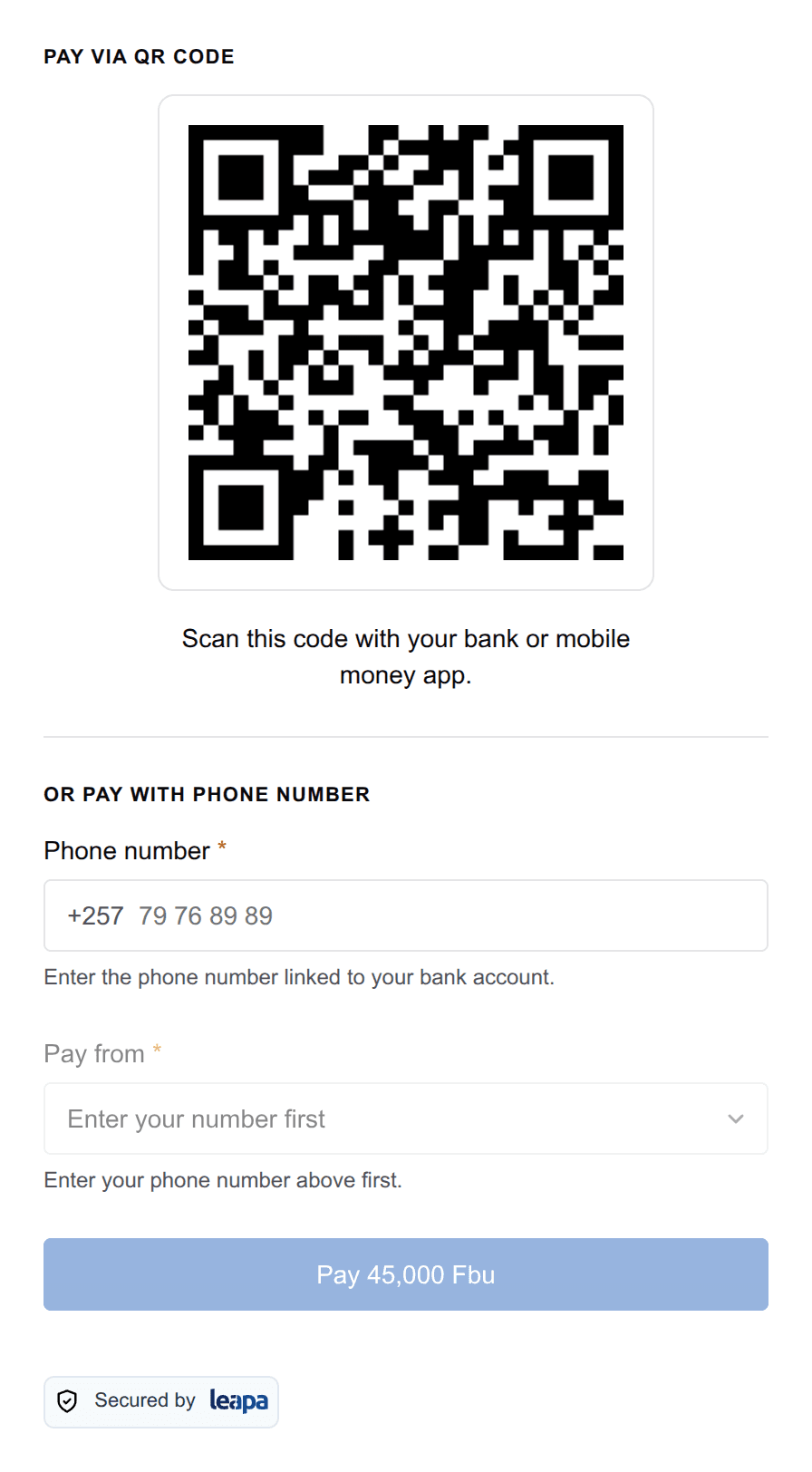
The QR rail shows a code. The payer opens their bank or mobile money app, scans it, and confirms there. The widget watches the invoice and swaps the code for a confirmation once the payment settles.
The phone rail takes a Burundi phone number, the eight digits after +257. The widget writes the country code beside the field rather than in it, and groups the digits in pairs as the payer types.
As soon as the number is complete, the widget looks up the accounts linked to it and asks which one the money should leave from. That lookup is a gate, not a convenience: the Pay button stays disabled until it returns at least one account. The line under the field says which of four things is happening: nothing typed yet, still looking, nothing found, or the lookup failed.
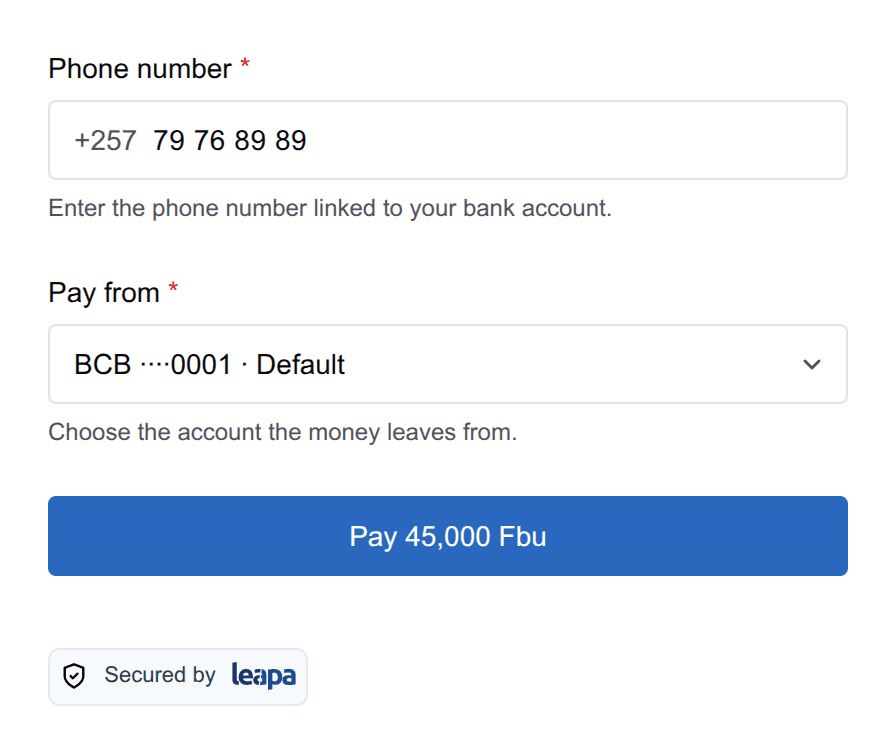
Pressing Pay sends the request. The payer approves it in their app, and the widget watches for the approval.
If you already know the payer, pass debtor-alias with their number, or debtor-account with debtor-bank-bic. The rail then shows who the request is addressed to instead of an empty field. The payer still presses Pay: nothing reaches anyone’s bank app until they act.
Sending a phone request withdraws the QR code at the central bank, and the QR disappears from the screen. The payer is never holding a scannable code and a pending approval for the same invoice at once, which would let them pay twice.
If the request fails or the payer dismisses it, the QR comes back. There is always a way to pay.
Because both rails watch the same invoice, either one can be the first to see the money. Whichever gets there first reports it, and the widget silences the other, so one payment produces exactly one onSuccess.
Reloading the page does not start the payment over. Each rail asks Leapa whether the invoice already has a live code or a live request, and re-shows that one rather than issuing a second at the central bank.
Both rails poll, meaning they ask Leapa every 3s whether the invoice has settled rather than waiting to be told. The budget is 100 checks, or five minutes. After that the widget stops asking.
Running out is not a refusal. The QR code is probably still scannable, and the request is still approvable until it expires. The widget says so and offers a Check again button rather than declaring the payment dead. A phone request that genuinely expired is judged by the expiry the central bank returned, not by the widget’s own clock.
A stopped watch is not a failed payment
Both rails reconcile on Leapa’s side, so a payment the widget stopped watching still settles. Confirm against your own records before you release goods.
BurundiPay fires the same two events as card, with different payloads. Success names the invoice and the rail’s reference:
{
  "amount": 45000,
  "currency": "BIF",
  "invoice_id": "your_invoice_id_here",
  "uetr": "97ed4827-7b6f-4491-a06f-b548d5a7512d"
}
The QR rail sends charge_id and qr_reference in place of uetr. Because the payer picks the method in invoice mode, branch on what arrived:
<script>
  widget.addEventListener("onSuccess", (event) => {
    const detail = event.detail;

    if (detail.charge) {
      recordCardPayment(detail.charge.id);
    } else {
      recordInvoicePayment(detail.invoice_id);
    }
  });
</script>
A rail that could not start fires onFailure with { code, message }, where the code is qr_generate_failed or rtp_request_failed. Events and responses covers both events in full.
On a test key the tile is not missing. It stays in the switcher, it can be chosen, and choosing it opens a blue panel naming the condition that withheld the rail — either your account not being enabled, or a check that could not be completed. The panel says which of the two it was, because they are different problems and only one of them is yours to fix. Blue rather than red: nothing is wrong with your page. On a live key the tile is gone, and a payer never sees any of this.
The console carries the same reasons in both modes, and is the first place to look. The widget writes merchant-facing messages there rather than to the payer’s screen, and each one appears once:
source-type with a currency other than BIF.The widget hides BurundiPay whenever it cannot get a clear yes. That means a slow network looks the same as an account that is not enrolled, which is why the console distinguishes them and a genuine “not enrolled” stays quiet.
One more message names your merchant ID and says BurundiPay was offered on the central bank’s record alone, against Leapa’s own record of a failed onboarding. Nothing is blocked, but report it: if your BurundiPay payments fail after the payer approves, that message is the reason.